Operations
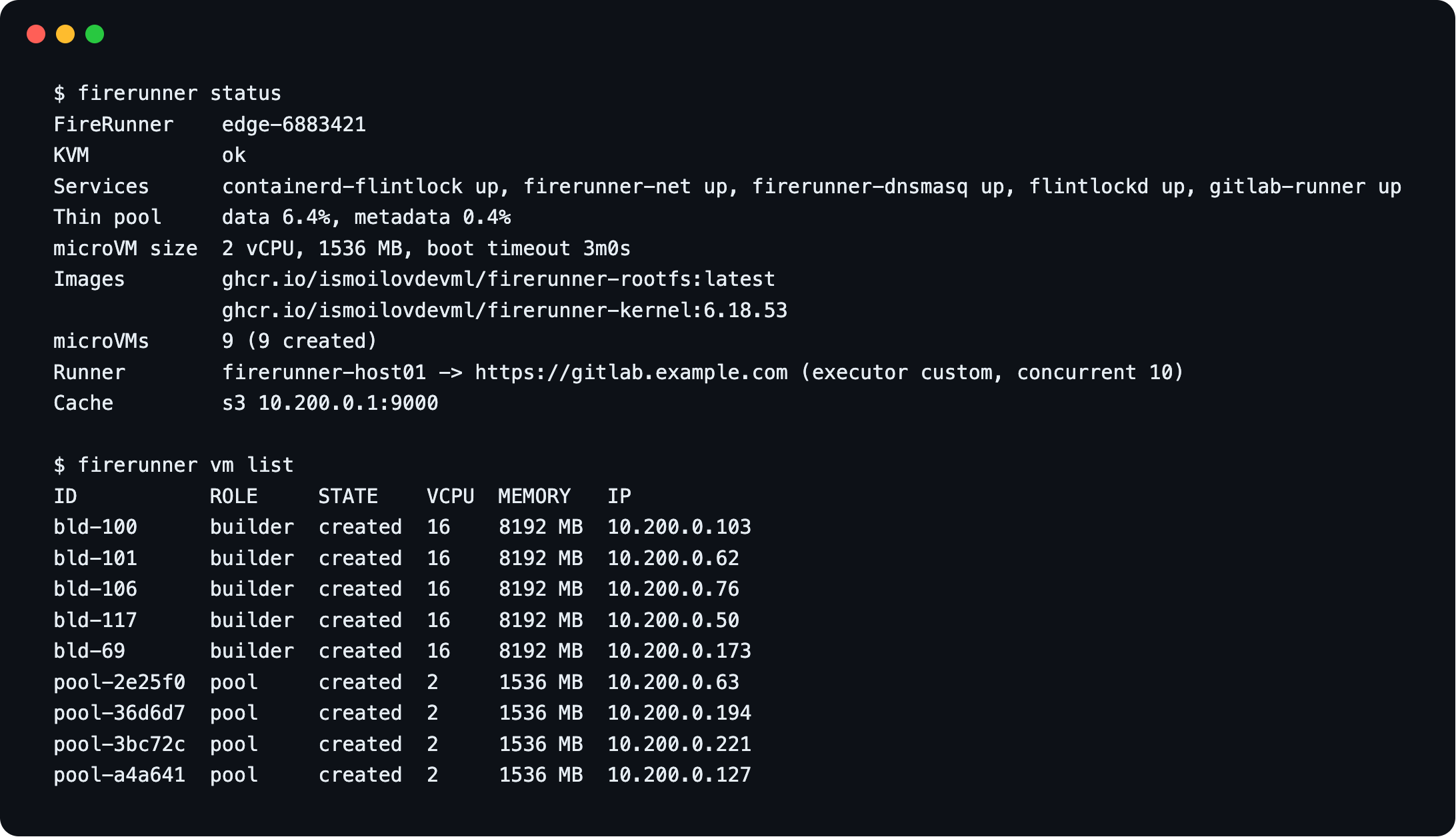
Health
sudo firerunner status     # one screen: services, disk, VMs, runner
sudo firerunner doctor     # every check, with a hint when one fails
Upgrade
sudo firerunner upgrade            # latest build of main (edge)
sudo firerunner upgrade --version v1.2.0
The release's checksums.txt must carry the release signature (Ed25519, key in
internal/upgrade/release-signing.pub), the binary must match its checksum and say it is the
version asked for; then it is replaced in place. v0.1.0 and v0.1.1 were published before releases
were signed: --allow-unsigned installs them. Running jobs, pre-booted VMs and builders keep
running. To upgrade the host stack (containerd, Firecracker, flintlock, gitlab-runner, network),
run the installer again.
v0.1.1 and older do not check signatures, so their firerunner upgrade does not either. For that
one upgrade, run the installer instead (FR_VERSION=<version>), which checks it.
After a new guest image is published, replace the idle VMs: sudo firerunner pool refresh.
To roll back, restore the previous binary and the config.yaml saved before the upgrade: an older
version refuses keys it does not know. v0.1.1 and older cannot talk to flintlockd over TLS: in
/etc/opt/flintlockd/config.yaml set insecure: true, delete the tls- lines and
systemctl restart flintlockd when no job runs.
The installer turns on mutual TLS for flintlockd's API in a run when no job runs: flintlockd
restarts with TLS, and firerunner gets the client certificate only once it could list the microVMs
with it; otherwise flintlockd goes back to no TLS. While jobs run it leaves TLS for a later run and
says so. sudo firerunner doctor warns while the API runs without TLS and when a certificate
(also the one flintlockd serves) expires within 90 days; a run of the installer renews them and
restarts flintlockd when no job runs.
microVMs
sudo firerunner vm list            # role: job, pool, builder or run
sudo firerunner vm logs <id>       # guest console, for boot problems (emptied past 64 MiB)
sudo firerunner vm rm <id>
sudo firerunner builder list
VMs that no job owns are deleted automatically every minute.
To drain a host, pause the runner in GitLab and wait until vm list shows no job VMs.
Rebuilding the thin pool
A thin pool keeps the chunk size it was created with. A new install uses 64K chunks (FR_THIN_CHUNK);
a pool from an older install keeps 512K until it is rebuilt. Check yours with
sudo lvs -o lv_name,chunk_size,zero flintlock/thinpool.
A rebuild deletes every microVM disk and the images flintlock pulled; the host pulls the kernel
and root filesystem again on the first boot. It keeps the registry mirrors, the cache: store and
the saved builder caches (/var/lib/firerunner, on the root disk). Running builders lose what they
cached since their last save. The host takes no jobs while it runs.
- Drain the host: pause the runner in GitLab and wait until
sudo firerunner vm listshows nojobVMs. - Stop taking jobs and refilling the pool, then delete the remaining microVMs. flintlockd deletes
in the background: repeat
vm listuntil it is empty.
sudo systemctl stop gitlab-runner firerunner
sudo firerunner vm rm --all
sudo firerunner vm list
- Stop the microVM stack and check that no Firecracker process is left:
sudo systemctl stop flintlockd containerd-flintlock
pgrep -x firecracker || echo "none left"
- Note the pool's disk, then remove containerd's thin devices, the volume group and the old state. containerd creates its devices with device-mapper directly, so LVM does not remove them:
sudo pvs -S vg_name=flintlock -o pv_name --noheadings     # e.g. /dev/sdb
sudo dmsetup ls --target thin | awk '$1 ~ /^flintlock-thinpool-snap-/ {print $1}' |
    xargs -r -n1 sudo dmsetup remove
sudo vgremove -y flintlock
sudo pvremove -y /dev/sdb && sudo wipefs -a /dev/sdb
sudo rm -rf /var/lib/containerd-flintlock /var/lib/flintlock /run/firerunner/pool.json
- Run the installer with that disk; it creates the pool and starts the stack again:
curl -sfL https://raw.githubusercontent.com/ismoilovdevml/firerunner/main/install.sh | sudo FR_DISK=/dev/sdb bash
- Check the new pool, start gitlab-runner and resume the runner in GitLab:
sudo lvs -o lv_name,chunk_size,zero flintlock/thinpool   # 64.00k, zero
sudo systemctl start gitlab-runner
sudo firerunner doctor
A volume group on more than one disk is rebuilt on the first one; add the others afterwards with
vgextend flintlock /dev/sdX and grow the pool with lvextend -L +<size> flintlock/thinpool.
Monitoring
Prometheus metrics are on 127.0.0.1:9477/metrics. To scrape from elsewhere, install with
FR_METRICS_ALLOW=<prometheus-ip>/32.
Import the Grafana dashboard and the alert rules from
deploy/. Alerts page only for
failures FireRunner or the host caused, never for failing project scripts. Watch:
- FireRunner failure rate and System failures by reason.
- Cold boots: above 20 %, raise
pool.size(if memory allows). - Host resources used: the fullest host for thin pool, committed memory, DHCP leases and disk. A full thin pool or DHCP range stops every new microVM; full memory makes them wait.
- Committed microVM memory and Jobs that waited over 30 s for memory: jobs queue when memory is full.
- Docker layer cache row: builders against their slots, why builders were removed, and cache copies that fail or are skipped for lack of room.
- Disk free: the saved builder caches and flintlock's microVM state.
- Flintlock errors: failed flintlock calls by RPC and gRPC code.
- Speed: Warm builds and Builder boot (a build that finds its builder booting waits for it), Stage duration p95 by stage (which part of a job grew).
- Node (node_exporter) row: the host under the microVMs. CPU steal (the hypervisor, on a
host that is itself a VM), IO wait and Pressure stall show a saturated host before jobs
fail. It needs node_exporter on the host, with the same
instancelabel in both scrape jobs (relabel both to the host name): the Node exporter variable follows the selected hosts.
The daemon logs one line per job (journalctl -u firerunner | grep '"job":"<id>"').
Logs: journalctl -u firerunner -u flintlockd -u gitlab-runner.
Alerts
Each rule in deploy/prometheus/firerunner-alerts.yml links to its section here. Names in
italics are panels of the Grafana dashboard.
FireRunnerDaemonUnhealthy
Critical. The daemon is not scraped, or its main loop has not passed for 2 minutes. Jobs still run, but every one cold-boots, nothing is cleaned up and the other FireRunner alerts are blind.
- Check:
journalctl -u firerunner -n 200. Before restarting, check what the loop may wait on, which a restart does not fix:systemctl status flintlockdandsudo timeout 10 lvs flintlock/thinpool(a hang means LVM or the disk is stuck). - Fix:
sudo systemctl restart firerunner. - Recovered:
curl -s 127.0.0.1:9477/healthzon the host printsok.
FireRunnerFlintlockDown
Critical. The daemon has not reached the flintlock API for 3 minutes: no microVM can be created and every new job fails in prepare.
- Check:
systemctl status flintlockd containerd-flintlock,journalctl -u flintlockd -n 100,sudo firerunner doctor. flintlockd needscontainerd-flintlock. - Recovered: Flintlock API is up and the next job gets a microVM.
FireRunnerServiceDown
Critical. flintlockd, containerd-flintlock, firerunner-net, firerunner-dnsmasq or
gitlab-runner has been inactive for 3 minutes: jobs fail (no microVM, network or DHCP) or are not
taken from GitLab.
- Check:
journalctl -u <service> -n 100,sudo firerunner doctor. - Fix:
sudo systemctl start <service>. Never restartfirerunner-netwhile jobs run: stopping it removes the bridge; its rules reload withsystemctl reload firerunner-net. - Recovered: Services shows it up.
FireRunnerCacheServiceDown
Warning. firerunner-registry (the Docker Hub mirror) or firerunner-cache (cache: storage) has
been down for 10 minutes. Jobs still run, but pull from Docker Hub directly (rate limits) or start
without their cache:.
- Check:
journalctl -u <service> -n 100,df -h /var/lib/firerunner. - Fix:
sudo systemctl start <service>. - Recovered: Services shows it up.
FireRunnerSystemFailures
Critical. In 30 minutes at least 3 jobs, and over 5 % of all jobs, failed because of FireRunner or the host. Failing project scripts and cancelled jobs do not count.
- Check the
reasonin System failures by reason:ssh_losta microVM died, usually a host OOM kill (see FireRunnerHostOOMKill);vm_bootDHCP or the guest boot (firerunner vm logs <id>);flintlock_errorflintlockd or the thin pool;admission_timeoutno host memory (or a busy admission lock) withinvm.boot_timeout;services,docker_auth,helper_stagethe job log says which step. Per job:journalctl -u firerunner | grep '"result":"system_failure"'. - Recovered: the alert resolves once fewer than 3 such failures are left in the last 30 minutes.
FireRunnerJobsWaitForMemory
Warning. In 30 minutes at least 3 jobs, and over 10 % of prepared jobs, waited more than 30 s for host memory before their microVM was created.
- Check Committed microVM memory by role: more
jobmemory than the running jobs need means leaked VMs (firerunner vm list); a largebuildershare meansbuilder.maxorbuilder.memory_mbis too high. - Fix: otherwise lower
concurrentorpool.size, or add memory. - Recovered: Jobs that waited over 30 s for memory stays at 0.
FireRunnerHostOOMKill
Warning. The kernel OOM-killed a process in the last 10 minutes, usually a firecracker microVM:
its job failed with ssh_lost, or its builder died.
- Check what was killed and how large it was:
journalctl -k --since -15min | grep -iE 'out of memory|killed process'. - Fix: admission keeps microVM memory below MemTotal minus
vm.host_reserve_mb, so the host needed more than that reserve: raise it (sudo firerunner config set vm.host_reserve_mb <MB>), or lowerconcurrent,pool.sizeorbuilder.max. - Recovered: no new kill; the alert resolves 10 minutes after the last one.
FireRunnerThinPoolFull
Warning. The devmapper thin pool that holds every microVM disk was over 85 % (data) or 75 %
(metadata) full at a reading in the last 15 minutes. From 95 % data or 90 % metadata no new
microVM starts (jobs, pool VMs and builders wait for room, then fail as admission_timeout):
running microVMs keep writing to their disks, and at 100 % every one of them fails; full metadata
can damage the pool.
- Check:
sudo lvs flintlock;firerunner vm listfor VMs that should be gone. - Fix now:
sudo firerunner builder rm --allfrees the builder VMs' disks, but also deletes every project's saved layer cache, so every next build is cold. - Fix for good: more space in the volume group (
vgextend flintlock <disk>), thenlvextend -l +100%FREE flintlock/thinpoolfor data orlvextend --poolmetadatasize +<size> flintlock/thinpoolfor metadata. - Recovered: Thin pool usage is below the threshold; the alert resolves 15 minutes later.
FireRunnerThinPoolUnknown
Warning. The daemon runs, but has not read the thin pool usage for 25 minutes, so FireRunnerThinPoolFull cannot fire.
- Check on the host:
sudo timeout 10 lvs flintlock/thinpool. An error or a hang means LVM or the disk is in trouble (dmesg -T | tail -50). The daemon logs its ownlvserror:journalctl -u firerunner | grep 'thin pool usage'. - Recovered: Thin pool usage shows data again.
FireRunnerDHCPLeasesExhausting
Critical. Over 80 % of the microVM DHCP range has been leased for 5 minutes. At 100 % new microVMs
get no address and jobs fail with got no DHCP lease.
- Check DHCP leases: mostly
livemeans that many microVMs exist (lowerconcurrentorpool.size); mostlystalemeans leases of deleted VMs are not released: installdnsmasq-utils(dhcp_release) and checkjournalctl -u firerunner | grep 'delete failed'. - Recovered: Host resources used shows DHCP leases below 80 %.
FireRunnerDiskFilling
Warning. The file system of /var/lib/firerunner/builder-cache or /var/lib/flintlock/vm has had
less than 15 % free for 15 minutes. Below 10 % no builder cache is saved; at 0 the registry mirror,
cache: uploads and flintlockd's microVM state can no longer be written.
- Check:
df -h /var/lib/firerunner /var/lib/flintlock/vm;sudo du -xsh /var/lib/firerunner/* /var/lib/flintlock/vm. - Fix:
cache:archives: run the installer again with a lowerFR_CACHE_DAYS. Saved builder caches: lowerbuilder.saved_cache_gb(applies at the next save);sudo firerunner builder rm --alldeletes every project's saved cache at once, so every next build is cold. - Recovered: Disk free is above 15 % of the file system.
FireRunnerBuildersFailing
Warning. In the last hour at least 3 builders failed to boot, stopped answering or lost their VM.
Those projects' docker build runs without the layer cache, or fails when its builder dies.
- Check:
journalctl -u firerunner --since -1h | grep -E 'builder boot failed|builder: (not answering|VM gone)'. - Fix:
no host memory for a buildermeans builders do not fit next to the jobs: lowerbuilder.maxorbuilder.memory_mb. Not answering or VM gone: usually BuildKit ran out of memory in the builder: raisebuilder.memory_mbor lowerbuilder.max. - Recovered: Builder removals by reason shows no
not_answeringorvm_gone; the alert resolves an hour after the last one.
Services
| Unit | Role |
|---|---|
firerunner |
daemon: pool, builders, cleanup, metrics |
flintlockd, containerd-flintlock |
start and stop microVMs; store their images |
firerunner-net, firerunner-dnsmasq |
microVM network, DHCP and DNS |
firerunner-registry |
registry mirrors for the VMs (Docker Hub and FR_REGISTRY_MIRRORS) |
firerunner-cache |
storage for cache: |
gitlab-runner |
takes jobs from GitLab |
Back up /etc/firerunner, /etc/opt/flintlockd and /etc/gitlab-runner/config.toml. Everything
else can be rebuilt.
Troubleshooting
Start with sudo firerunner doctor. For an alert, see its section under Alerts.
| Symptom | Fix |
|---|---|
installer: /dev/kvm not found |
turn on virtualization or nested virtualization |
installer: no blank disk found |
attach an empty disk or set FR_DISK |
| jobs stay pending | the job needs tags: [firecracker]; check the runner is online in GitLab |
got no DHCP lease |
systemctl status firerunner-net firerunner-dnsmasq; then firerunner vm logs <id> |
waiting for host memory for long |
fewer parallel jobs, a smaller pool.size, or more RAM; firerunner_memory_committed_bytes shows who holds it |
| firewall rules need re-applying | systemctl reload firerunner-net; never restart it while jobs run, stopping it removes the bridge |
| jobs cannot reach an internal host | its network overlaps 10.200.0.0/24 or the VM Docker ranges; change FR_SUBNET or vm.docker_bip |